What's New in Propel Rx 2.1 SP1
Key Enhancements and Fixes
-
Packaging should no longer be skipped when a full Owe Balance is edited and reduced.
-
Duplicate Accounts Receivable (AR) claims should no longer be sent to Propel POS when prescriptions are manually picked up on a different day than when they're processed.
-
Inventory should no longer be deducted twice when an Owe Balance created upon Fill is manually adjusted from the Rx > Owe Balance window.
-
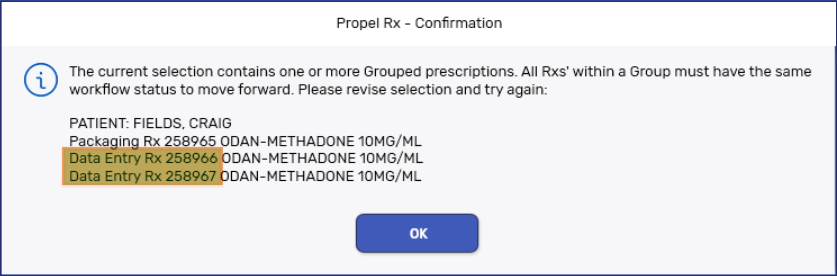
Packaging a methadone prescription with carries should no longer be allowed if Group Methadone Carries is on and any one of the prescriptions in the group has not completed Data Entry. The prompt below appears if the prescriptions in the group do not have the same Workflow status.
-
Owe Balances should no longer skip Packaging after auto-reconcilation.
-
Ontario, Newfoundland and Labrador, and New Brunswick pharmacies only: The Claim Summary window should now appear for methadone carries when the Patient Pays amount is greater than $0 and Skip Claim Summary is off.
-
The SIG and other dynamic fields, including the Patient Name and Drug Name, should no longer be cut off on Thermal labels.
-
Transferred out prescriptions should no longer appear on the Compliance Dosett Grid report.
-
The sold date and time for Nursing Home prescriptions should no longer be transmitted to Propel POS upon Workflow completion if automatic pickup is not configured for the prescription type in Workflow Preferences. The sold date and time should correspond to when these prescriptions achieved a Picked Up status in Propel Rx.
-
The Claim Summary window should now display when a prescription is billed to both a House Charge plan (100% deductible) and a Third Party plan, the Patient Pays amount is greater than $0, and the Skip Claim Summary preference is turned off for the House Charge plan.
Enhancements
 Hard Copy Updates to the Half and Daily Laser Labels (applies to pharmacies using the new .net PHS labels)
These enhancements only apply to pharmacies that received the laser label update. This includes Newfoundland and Labrador stores, as well as select pilot stores in each province.
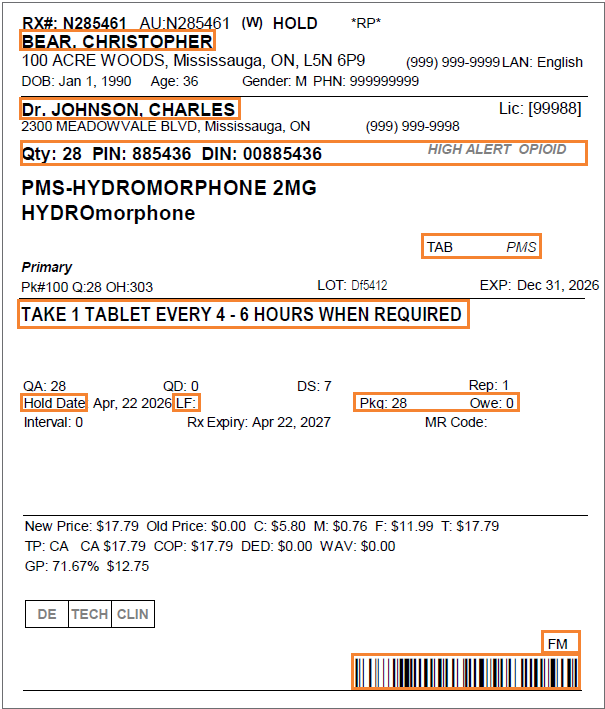
We enhanced the layout of the Half and Daily Laser Hard Copy to use space more efficiently and formatted various fields so key information is easier to find.
Patient and Prescriber Information
-
The Patient Name and Prescriber Name now appear in bigger text.
-
A line now separates the patient information from the prescriber information on the Daily Laser label, to align with the layout of the Half label.
Drug Information
-
The Quantity now appears with a Qty header and no surrounding brackets.
-
The Qty, PIN, DIN, and High Alert and Opioid indicators now appear above the Drug Name.
-
The Qty, PIN, DIN, and Drug Name now appear in bigger text.
-
The High Alert and Opioid indicators now print in smaller text to free up more space.
-
The Drug Form and Manufacturer now appear in smaller text below the Drug Name to the right.
Prescription Information
-
The SIG now appears in larger text.
-
The Fill Date header now displays as Hold Date for prescriptions placed on Hold.
-
Last Fill Date now appears with a LF header and is closer to the Fill Date.
-
Qty Packaged and Qty Owe have been abbreviated to Pkg and Owe. These fields now appear on the same line as Fill Date and Last Fill Date.
-
The Trial Rx indicator now appears on the same line as the dosing information for methadone.
Pricing and Verification Information
-
The verification boxes now have less width. In British Columbia, all boxes now appear on a single row.
-
The pharmacist's Initials now appear above the barcode.
-
The barcode is now at the bottom right of the Hard Copy.
Fixes
Drug
-
The Guided Reorder Point for an Order Group should now recalculate when a product is removed from the group.
Labels
Half Labels
-
Split quantities should now print correctly on shrink labels.
-
Half labels should no longer print when the Labels field in Rx Detail is set to 0.
Thermal Labels
-
Thermal labels for non-batched prescriptions should now be given priority in the print queue when large batches are in progress.
Inventory
-
Inventory should no longer be deducted twice when an Owe Balance created upon Fill is manually adjusted from the Rx > Owe Balance window.
Patient
-
Highlighted prescriptions on the Patient Profile should no longer be deselected when scrolling. This prevents prescriptions from being dropped from processing when multiple prescriptions are selected.
-
The OK button on the Patient Profile modal window should now appear when the window is opened during prescription processing, printing, transferring, or refusing.
-
Patient attachments and priority notes should now be sorted by date with the most recent ones at the top.
POS Integration
-
The sold date and time for Nursing Home prescriptions should no longer be transmitted to Propel POS upon Workflow completion if automatic pickup is not configured for the prescription type in Workflow Preferences. The sold date and time should correspond to when these prescriptions achieved a Picked Up status in Propel Rx.
-
Duplicate Accounts Receivable (AR) claims should no longer be sent to Propel POS when prescriptions are manually picked up on a different day than when they're processed.
Prescription
-
An Owe Balance should no longer be incorrectly generated after Fill when a drug has multiple monitored pack sizes and a non-default pack size is selected for the prescription.
-
Packaging should no longer be skipped when a full Owe Balance is edited and reduced.
-
Packaging a methadone prescription with carries should no longer be allowed if Group Methadone Carries is on and any one of the prescriptions in the group has not completed Data Entry. The prompt below appears if the prescriptions in the group do not have the same Workflow status.
-
The Claim Summary window should now display when a prescription is billed to both a House Charge plan (100% deductible) and a Third Party plan, the Patient Pays amount is greater than $0, and the Skip Claim Summary preference is turned off for the House Charge plan.
-
Ontario, Newfoundland and Labrador, and New Brunswick pharmacies only: The Claim Summary window should now appear for methadone carries when the Patient Pays amount is greater than $0 and Skip Claim Summary is off.
-
Batched prescriptions should no longer get stuck in Data Entry when they are Detailed and placed on Hold.
-
Owe Balances should no longer skip Packaging after auto-reconcilation.
Reports
-
Lab result reports from the Patient Folder Clinical tab should now print decimal values.
-
The following reports should now sort as expected: Drug Movement, Gross Profit by Prescription, Gross Profit by Third Party, Inventory History, Inventory Summary, Mixture Movement, Nursing Charges (Group), Patient Official Receipt, Patient Profile Condensed, TMR, and Waiting for Pickup & Delivery.
-
Transferred out prescriptions should no longer appear on the Compliance Dosett Grid report.
-
On the MAR and TAR by Dosage reports, each cell should display information for only one drug. If a prescription's instructions are too long to fit in a single cell, the text continues into the next cell, and the following drug moves to the next available cell.
-
On the MAR Partial report, prescription instructions should no longer be cut off.